
일단 시작.
[TIL] Github Action으로 DB 연동! - Spring Boot Test 통과 확인 본문
Spring Boot Test는 application을 실행시켜보는 작업이라서 DB 연동이 필요하다. 우리는 MySQL 기반으로 코드를 작성했기 때문에 Github Action이 실행되는 Runner에서도 MySQL을 설치해보았다. 아마 H2를 설치해서 확인해도 dialect 부분만 바꿔서 작성하면 괜찮을 것 같지만. 익숙한 MySQL을 설치하기로 했다.
GitHub Marketplace에서 MySQL을 어떻게 설치하면 되는지 잘 나와있다.
Start MySQL - GitHub Marketplace
Start a MySQL database
github.com
steps:
- uses: samin/mysql-action@v1
  with:
    host port: 3800 # Optional, default value is 3306. The port of host
    container port: 3307 # Optional, default value is 3306. The port of container
    character set server: 'utf8' # Optional, default value is 'utf8mb4'. The '--character-set-server' option for mysqld
    collation server: 'utf8_general_ci' # Optional, default value is 'utf8mb4_general_ci'. The '--collation-server' option for mysqld
    mysql version: '8.0' # Optional, default value is "latest". The version of the MySQL
    mysql database: 'some_test' # Optional, default value is "test". The specified database which will be create
    mysql root password: ${{ secrets.RootPassword }} # Required if "mysql user" is empty, default is empty. The root superuser password
    mysql user: 'developer' # Required if "mysql root password" is empty, default is empty. The superuser for the specified database. Of course you can use secrets, too
    mysql password: ${{ secrets.DatabasePassword }} # Required if "mysql user" exists. The password for the "mysql user"
여기서는 host port가 3800으로 되어 있지만 default값인 3306으로 지정해 주었다.
3800으로 지정해 주니
Caused by: java.net.ConnectException: Connection refused
	at java.base/sun.nio.ch.Net.pollConnect(Native Method)
	at java.base/sun.nio.ch.Net.pollConnectNow(Net.java:672)
	at java.base/sun.nio.ch.NioSocketImpl.timedFinishConnect(NioSocketImpl.java:547)
	at java.base/sun.nio.ch.NioSocketImpl.connect(NioSocketImpl.java:602)
	at java.base/java.net.SocksSocketImpl.connect(SocksSocketImpl.java:327)
	at java.base/java.net.Socket.connect(Socket.java:633)
	at com.mysql.cj.protocol.StandardSocketFactory.connect(StandardSocketFactory.java:153)
	at com.mysql.cj.protocol.a.NativeSocketConnection.connect(NativeSocketConnection.java:63)
	... 143 more
다음 오류가 뜬다. 찾아보니 MySQL의 포트 번호를 바꿔주려면 다른 명령어를 실행시켜줘야 하는 것 같아 기본값인 3306으로 지정해주었다.
mysql root password는 dafault가 empty이므로 따로 설정해주지 않았다.
내 MySQL 설치 부분 코드는 이렇다.
- name: MySQL 설치
  uses: samin/mysql-action@v1
  with:
    host port: 3306 # Optional, default value is 3306. The port of host
    container port: 3307 # Optional, default value is 3306. The port of container
    character set server: 'utf8' # Optional, default value is 'utf8mb4'. The '--character-set-server' option for mysqld
    collation server: 'utf8_general_ci' # Optional, default value is 'utf8mb4_general_ci'. The '--collation-server' option for mysqld
    mysql version: '8.0' # Optional, default value is "latest". The version of the MySQL
    mysql database: test # Optional, default value is "test". The specified database which will be create
    mysql user: developer # Required if "mysql root password" is empty, default is empty. The superuser for the specified database. Of course you can use secrets, too
    mysql password: ${{ secrets.DB_PASSWORD }}
MySQL 설치를 했으면 이에 맞게 application 설정 파일도 같이 설정을 해줘야 한다.
- name: yml 파일 생성
  run: |
    cd ./src/main/resources
    rm -rf ./application.properties
    touch ./application.yml
    echo "${{ secrets.APPLICATION_YML }}" > ./application.yml
  shell: bash
기존 git에 올렸던 application.properties에 ${DS_URL}로 환경변수로 설정을 하여 넣어줬기 때문에 CI는 이를 인식하지 못한다. 그래서 아예 application.properties를 지워주고 application.yml파일로 다시 설정을 해준다.
spring:
  datasource:
    driver-class-name: com.mysql.cj.jdbc.Driver
    url: jdbc:mysql://localhost:3306/test
    username: developer
    password: {바로 비밀번호 입력해주었다! 어차피 git-secret에서 관리해주므로!}

  jpa:
    properties:
      hibernate:
        format_sql: true
    hibernate:
      ddl-auto: create
    open-in-view: false
    database-platform: org.hibernate.dialect.MySQL8Dialect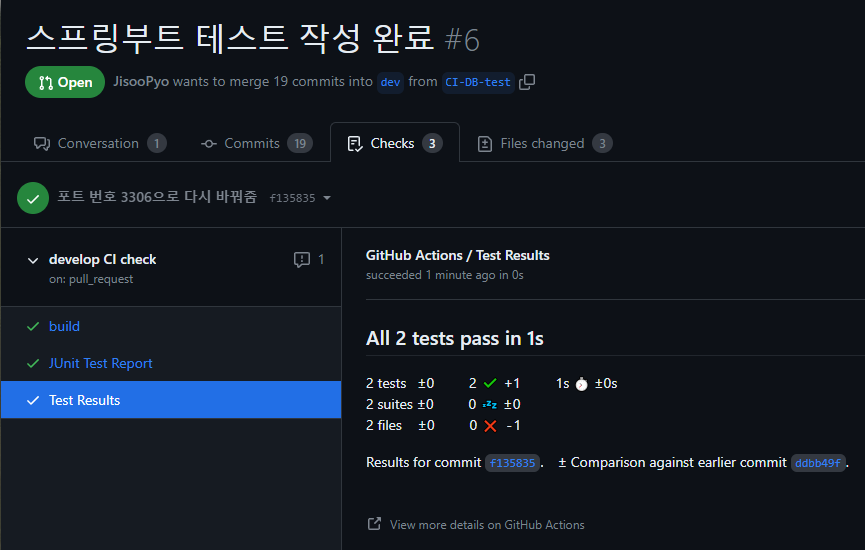
전체 CI 코드
# This workflow uses actions that are not certified by GitHub.
# They are provided by a third-party and are governed by
# separate terms of service, privacy policy, and support
# documentation.
# This workflow will build a Java project with Gradle and cache/restore any dependencies to improve the workflow execution time
# For more information see: https://docs.github.com/en/actions/automating-builds-and-tests/building-and-testing-java-with-gradle

name: develop CI check

on:
  push:
    branches: [ "dev" ]
  pull_request:
    branches: [ "dev" ]

permissions:
  checks: write
  pull-requests: write

jobs:
  build:

    runs-on: ubuntu-latest

    steps:

      - name: 레포지토리 체크아웃
        uses: actions/checkout@v3

      - name: JDK 17 설치
        uses: actions/setup-java@v3
        with:
          java-version: '17'
          distribution: 'adopt'

      - name: MySQL 설치
        uses: samin/mysql-action@v1
        with:
          host port: 3306 # Optional, default value is 3306. The port of host
          container port: 3307 # Optional, default value is 3306. The port of container
          character set server: 'utf8' # Optional, default value is 'utf8mb4'. The '--character-set-server' option for mysqld
          collation server: 'utf8_general_ci' # Optional, default value is 'utf8mb4_general_ci'. The '--collation-server' option for mysqld
          mysql version: '8.0' # Optional, default value is "latest". The version of the MySQL
          mysql database: test # Optional, default value is "test". The specified database which will be create
          mysql user: developer # Required if "mysql root password" is empty, default is empty. The superuser for the specified database. Of course you can use secrets, too
          mysql password: ${{ secrets.DB_PASSWORD }}

      - name: yml 파일 생성
        run: |
          cd ./src/main/resources
          rm -rf ./application.properties
          touch ./application.yml
          echo "${{ secrets.APPLICATION_YML }}" > ./application.yml
        shell: bash

      # gradle 실행 허가
      - name: Run chmod to make gradlew executable
        run: chmod +x ./gradlew

      - name: 어플리케이션 실행 테스트(테스트 코드 제외하고 실행)
        run: ./gradlew clean build --exclude-task test

      - name: Test 실행(테스트 코드만 실행)
        run: ./gradlew --info test

      - name: 테스트 결과 PR에 코멘트 작성
        uses: EnricoMi/publish-unit-test-result-action@v2
        if: always()  # 테스트가 실패했을때만 or 테스트가 성공했을때만 알려주기(여기선 둘다!)
        with:
          files: |
            **/build/test-results/**/*.xml

      - name: Publish Test Report
        uses: mikepenz/action-junit-report@v3
        if: success() || failure() # always run even if the previous step fails
        with:
report_paths: '**/build/test-results/test/TEST-*.xml''STUDY > GIT' 카테고리의 다른 글
| [TIL] Git Rebase를 사용해서 일 효율 높이기! (0) | 2023.11.11 |
|---|---|
| [TIL] Github Action 3 - Mockito 테스트(O) (0) | 2023.08.03 |
| [TIL] Github Action 2 - Workflow 구성해보기(작성 중) (0) | 2023.08.01 |
| [TIL] Github Action이란? CI/CD에 대해 (0) | 2023.07.28 |
| [Git] fork가 아니라 같은 Repo의 Collaborator일 때, Pull Request 방법 기록(레포지토리 파는 사람 / Collaborator) (1) | 2023.07.17 |
'STUDY/GIT' Related Articles
more

